

02 sep 2026
Need to send a PDF by email, upload a job application, or just free up some storage? There are several ways to reduce a PDF’s file size, most without having to install anything.
Quick answer: You can compress a PDF with an online compressor or tools already available on your device. On Mac, use Preview; on Windows, try Microsoft Word; and on iPhone or iPad, use the Files app. For scanned PDFs on iPhone and Android, iScanner lets you choose a compression level and reduce the file size before sharing.
Here’s how to make a PDF smaller while keeping it readable.
| Device or use case | Method | Best for |
| Any device | Online PDF compressor | Fast, convenient compression |
| Mac | Preview | One PDF at a time |
| Windows | Microsoft Word | Word-compatible PDFs |
| iPhone/iPad | Files | Quick built-in compression |
| iPhone/Android | iScanner | Scans and mobile workflows |
| Email/uploads | Compression tool | Meeting file-size limits |
The best way to compress a PDF depends on its contents. Image-heavy and scanned PDFs usually have more room for compression than mostly text-based files.
An online PDF compressor works the same way on any device, so you won’t have to go through the hassle of figuring out how to compress files on yours. It’s an especially convenient option when you need a smaller PDF for Gmail, website uploads, or other platforms. .
With the iScanner online PDF compressor:
The tool works on desktop, tablet, and mobile, requires no registration, and supports PDFs up to 200 MB.
Pro tip: If you’re wondering how to compress a PDF on Chromebook or how to compress PDF on Linux, a browser-based tool is usually the simplest option.
To compress a PDF in Preview on a Mac:
Preview is also an easy way to reduce PDF size without losing too much quality on a Mac. Just to be sure, though, check the exported document before deleting the original, since strong compression can make images less sharp.
If you need to compress PDFs in batches on Mac, an online or dedicated PDF tool is generally more practical than repeating the Preview process file by file.
When figuring out how to compress multiple PDFs at once, keep copies of the originals and check the compressed files before sharing them.
If Word can open your PDF correctly:
Microsoft recommends the Minimum size (publishing online) option when file size matters more than print quality.
Printing a document back to PDF can sometimes create a smaller file.
Results vary, so compare the new file with the original before using it. This method may also affect interactive elements or other PDF features.
Here’s how to reduce PDF size on iPhone or iPad without installing another tool:
For more control over scanned documents, you can choose how much to compress your PDF when sharing it from iScanner:
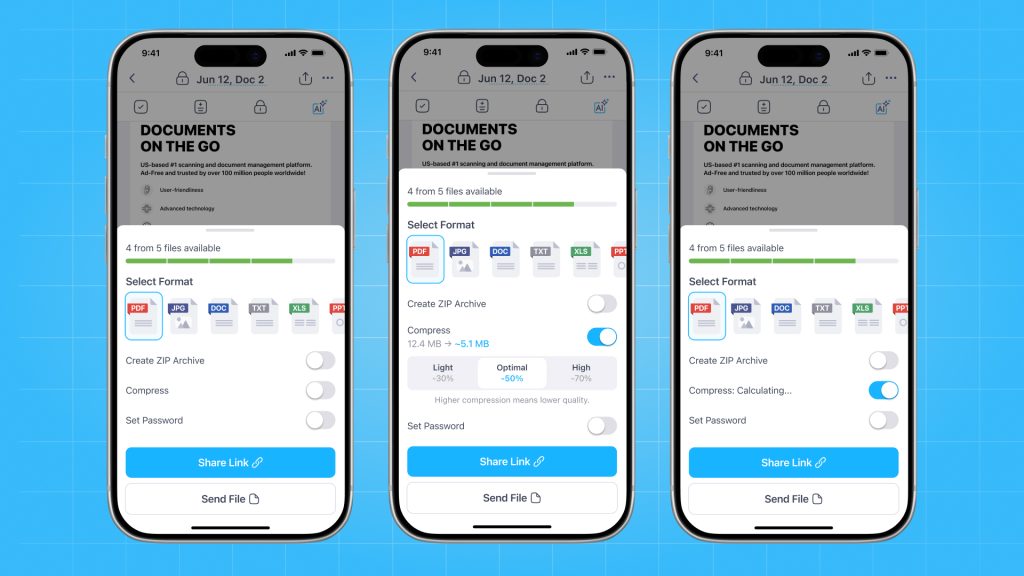
Higher compression creates a smaller file but can reduce image quality. Optimal (50%) offers a practical balance between file size and readability, while High (70%) is useful when you need to meet a strict upload or attachment limit.
This way, you can scan, edit, compress, and send paperwork from one app while choosing the compression level that fits your needs.
Android doesn’t have one universal built-in feature for reducing PDF file size. A PDF compression app or online tool is usually the easiest solution.
With iScanner, you can compress a PDF directly from the mobile app:
Need to get a PDF down to 1 MB, 500 KB, 200 KB, or even 100 KB? Start with standard compression and check the resulting file size. The smaller your target, the more you may need to reduce image quality or remove unnecessary content.
Start with standard compression, then check the resulting size. If the file is still too large:
There’s no universal answer to how much you can compress a PDF. A 10 MB image-heavy scan may shrink substantially, while an already optimized text PDF may change very little.
If you need to compress a PDF for email, check the attachment limit before you start. For example, personal Gmail accounts allow up to 25 MB in attachments. If your attachments exceed that limit, Gmail automatically replaces the attachment with a Google Drive link. The same principle applies when you compress a PDF for a website upload or reduce its size for a job application.
Wondering why your PDF is so large? Scanned PDFs often contain a high-resolution image for every page. Color, resolution, and page count can quickly increase the file size.
To compress a scanned PDF, prioritize readability over the smallest possible size. Reduce image resolution moderately, crop unnecessary areas, and use grayscale for documents that don’t require color.
If you need to compress a PDF with images, always zoom in afterward and check small text, signatures, stamps, and fine details.
Does compressing a PDF reduce quality? It can. Lossy compression removes some image data to create a smaller file. The goal is to find a balance where the difference isn’t noticeable for the document’s intended use.
If your compressed PDF is still too big, look at what is taking up space. Large photos and high-resolution scans are common causes.
You can delete unnecessary pages, downsize images, split the PDF, or rescan pages at a lower resolution. Flattening a PDF to reduce size can sometimes help with documents containing layers or annotations, but it can also remove editable or interactive elements.
If text needs to remain searchable, check the finished document after compression. To compress a PDF and keep the text searchable, avoid workflows that turn searchable text into flat page images.
If you’re asking, “Is it safe to compress a PDF online?”, consider what the document contains before uploading it.
For everyday files, use a service with a clear privacy policy and secure processing. For confidential business, financial, medical, or identity documents, review the provider’s data-handling practices or use an offline option.
Use an online compressor or your device’s built-in compression feature. For scans, reducing image resolution can also make a significant difference.
Use moderate compression and check the result at normal size and zoom in to inspect the details. Some size reduction may involve a quality trade-off, especially with image-heavy PDFs.
High-resolution scans, photographs, color pages, embedded fonts, and a high page count can all increase PDF size.
Yes. Compress the PDF before attaching it. If it remains above the email service’s attachment limit, consider sharing it through cloud storage instead.